
Judge model swaps with your Langfuse evals
If your team already says what “good” means in Langfuse, with an LLM-as-a-judge evaluator and a dataset of expected answers, you can bring both into Metergraph and use them to judge a model swap. Metergraph copies the judge and the dataset, runs the judge itself on your current model’s answers and on each candidate’s answers to the same cases, and an acceptance policy you write decides whether a recommended switch stands.
Metergraph only reads from Langfuse. It never writes a score, a dataset, an evaluation rule or an LLM connection there, and it never uses a Langfuse key to call a model.
How the pieces fit
Section titled “How the pieces fit”| Piece | What it is | Where it lives |
|---|---|---|
| Connection | A Langfuse project key pair, stored encrypted | Imports |
| Imported judge | A copy of one Langfuse evaluator, kept as an immutable revision | Evaluation library |
| Reference dataset | A copy of one Langfuse dataset, kept as an immutable version of expected answers | Reference cases |
| Judge model | The model Metergraph runs the judge on, pinned into a new revision | Evaluation library |
| Calibration | The judge re-run on calls it already scored in Langfuse, to measure agreement | Evaluation library and the workload page |
| Suite | An ordered list of checks, each pinned to one revision | Evaluation library |
| Reference binding | Which case field each judge input reads, for one suite revision and one dataset version | Reference cases |
| Assignment | Which workload a suite revision evaluates | The workload page and Evaluation library |
| Acceptance policy | The thresholds that decide whether a switch stands, per assignment | API only |
Every saved object is versioned and immutable. A change in Langfuse creates nothing in Metergraph until you import again, a re-import adds a revision without moving anything that pins the old one, and an analysis freezes what it used when it starts, so a later edit never changes a finished report.
What you need
Section titled “What you need”| Role | owner or member. A viewer can browse the library and the results but cannot use a connection’s key pair or save anything |
| Langfuse | Langfuse Cloud, or self-hosted Langfuse 4.23.0 or later. Earlier self-hosted releases do not expose evaluator definitions |
| A judge | A Langfuse LLM-as-a-judge evaluator that meets the supported configuration |
| A dataset | A Langfuse dataset whose items have the input your workload sees and, if the judge reads one, an expected output |
| Content import | The connection’s Import prompts and responses box ticked. The dataset import and calibration both read content |
| A workload | An analysis has already found the workload you want to judge. See Run your first analysis |
The evaluation library, reference cases and the steps below are part of the
managed analysis workflows. If a deployment has turned those off, the pages say
so and the endpoints answer 503 managed_features_disabled.
Where each step happens
Section titled “Where each step happens”Some steps have a dashboard page and some are API calls today.
| Step | Where |
|---|---|
| 1. Connect Langfuse | Imports page |
| 2. Import the judge | API |
| 3. Import the dataset | Reference cases page |
| 4. Choose the judge’s model | API |
| 5. Calibrate the judge | API to start it; the result shows in the Evaluation library and on the workload page |
| 6. Save a suite and bind it to the dataset | Find opportunities checks editor, then Reference cases |
| 7. Assign the suite and save an acceptance policy | Evaluation library for the assignment, API for the policy |
| 8. Run the swap analysis | API |
| 9. Read the evidence | Suite results page |
The API steps use your dashboard session, as the other dashboard API calls in
these docs do. Send the metergraph_session cookie from a signed-in browser:
curl https://app.metergraph.dev/v1/import-connections \ -H "Cookie: metergraph_session=..."Walk through it
Section titled “Walk through it”-
Connect Langfuse
Section titled “Connect Langfuse”On Imports, choose Connect, then Langfuse. Enter the project’s public key (
pk-lf-...) and secret key (sk-lf-...), a project label, and the host if you are not on Langfuse Cloud EU. Tick Import prompts and responses: without it, the dataset import is refused with409 content_not_includedand calibration has no content to re-check. Import from Langfuse covers every field.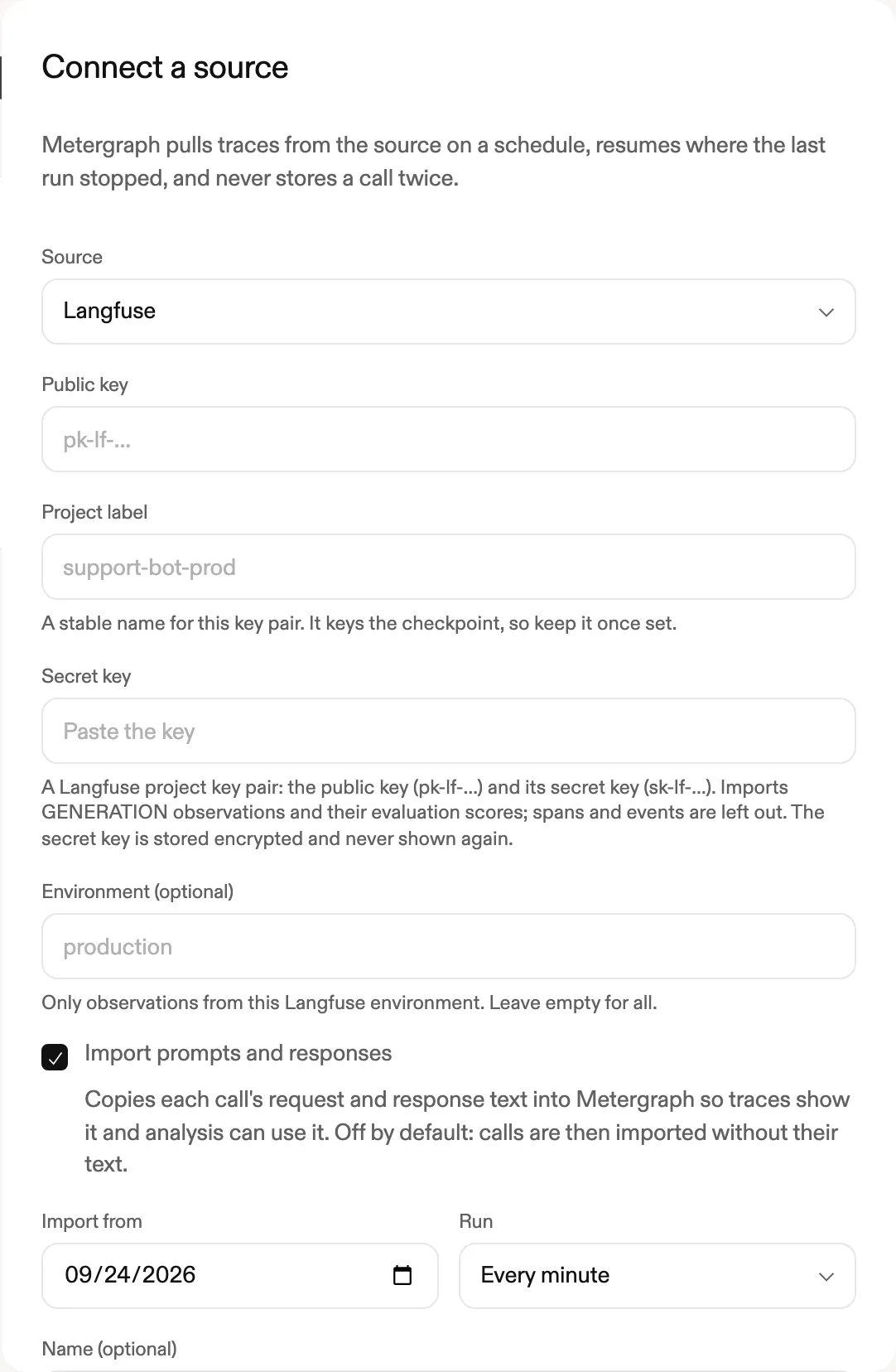
The same connection keeps importing your generations and their scores on a schedule. Those scores are what calibration reads in step 5.
Langfuse has no read-only key scope. A key pair made for this project, and revoked when you no longer need it, is the safest choice.
-
Preview and import the judge
Section titled “Preview and import the judge”Find the connection’s
idinGET /v1/import-connections, then preview every evaluator in its Langfuse project:curl https://app.metergraph.dev/v1/import-connections/$CONNECTION_ID/langfuse-evaluators \-H "Cookie: metergraph_session=..."Each item has an
import_status:supported: the judge can be imported.judge_modelalready says which Metergraph model would run it, or why you will have to choose one.reference_only: a code evaluator. It can be imported as a read-only copy, but it never runs.unsupported:reasonslists every code and message. The table below explains each one.
The preview also returns
upstream_definition(the evaluator as Langfuse holds it),definition(what Metergraph would store: the chat messages in order, one input per prompt variable, and the output as a typed score) and, for a judge you have imported before,local.stateand thediffa re-import would make. Evaluation-rule filters and sampling come back asrule_hintsand are never applied: Metergraph decides what it evaluates.Import one:
curl -X POST https://app.metergraph.dev/v1/import-connections/$CONNECTION_ID/langfuse-evaluators/import \-H "Content-Type: application/json" \-H "Cookie: metergraph_session=..." \-d '{"evaluator_id": "<Langfuse evaluator id>", "name": "answer-correct"}'201creates a revision.200withunchanged: truemeans the latest revision already holds this Langfuse version. The judge now appears in the Evaluation library as imported from Langfuse, with its Langfuse evaluator id and version. Both endpoints allow six reads a minute per workspace. -
Import the dataset
Section titled “Import the dataset”On Reference cases, the Import from Langfuse card lists your Langfuse connections. Choose one and Preview datasets. Each dataset shows how many active items it has, how many become cases, which items are skipped and why, and what an import would create. Importing reads the items exactly as the preview saw them, even if Langfuse changed in between, and publishes them as the next version of a reference dataset.
Only an item’s
expectedOutputbecomes an expected answer. An item with no expected output still imports, because a judge that does not read one can score it. Archived items, items that reference Langfuse media, and the other cases in Dataset items that are skipped are left out and listed, never dropped silently. -
Choose the model that runs the judge
Section titled “Choose the model that runs the judge”An imported judge names its model the Langfuse way, so it does not run until you pin a model Metergraph can call. See the options:
curl https://app.metergraph.dev/v1/evaluators/answer-correct/judge-model \-H "Cookie: metergraph_session=..."The response shows the model the judge used in Langfuse, a proposal when one of this deployment’s models is the same model, or the incompatibility that prevents one, and every option with its price, where its calls go and which credential pays for them. Options are this deployment’s model channels (
route_key) and your custom model endpoints from Settings (candidate_id). No credential ever comes from Langfuse.Pin one:
curl -X POST https://app.metergraph.dev/v1/evaluators/answer-correct/judge-model \-H "Content-Type: application/json" \-H "Cookie: metergraph_session=..." \-d '{"route_key": "<route_key from options>"}'Choosing a different model from the one the judge used in Langfuse needs
"acknowledge_model_change": true, because its verdicts are no longer comparable with the judge’s Langfuse scores until a calibration says they agree. A judge on the Langfuse project’s default model always needs this: the Langfuse API does not say which model that is. Metergraph never picks a model for you.Pinning creates a new revision that holds the model. The imported revision stays as it was.
-
Calibrate the judge against its Langfuse scores
Section titled “Calibrate the judge against its Langfuse scores”Copying a judge does not prove it behaves as it did in Langfuse: the model, how variables are rendered and how the answer is read can all differ. A calibration re-runs the resolved judge on calls that same judge already scored in Langfuse and measures how often it agrees. Until a calibration passes, a candidate the judge scores can never be called as good as your current model.
See what a calibration would re-check and cost, then start one with a budget:
curl "https://app.metergraph.dev/v1/evaluators/answer-correct/calibration-plan?max_cost_usd=5" \-H "Cookie: metergraph_session=..."curl -X POST https://app.metergraph.dev/v1/evaluators/answer-correct/calibrations \-H "Content-Type: application/json" \-H "Cookie: metergraph_session=..." \-d '{"max_cost_usd": 5}'A score counts as the judge’s own only when Langfuse’s evaluation worker recorded this evaluator and one of its imported versions in the score’s metadata. Langfuse has done that since 4.17.0. A score with the same name written by your code, by an annotation or by another evaluator is never used. Each re-checked case is a call this connection imported with its content.
max_casesdefaults to 50, at most 200, andmax_cost_usdis at most the deployment’sjudge_calibration_max_cost_usd, default 25.A calibration passes only when all of these hold:
Measure Required Scores re-checked At least 20 Attempted cases that completed At least 90% Agreement, boolean and categorical judges At least 85% Mean error as a share of the score range, numeric judges At most 0.1 Correlation, numeric judges whose scores vary At least 0.7 The result shows beside the judge in the Evaluation library and on the workload page: calibrated, blocking, or not calibrated, with the reason. The calibration is of that exact revision, so choosing the model again or importing again needs a new one.
-
Save a suite and bind it to the dataset
Section titled “Save a suite and bind it to the dataset”In Find opportunities, open Analyze, choose the workload and Review checks. Under Start from, add the judge from your own evaluators: imported judges are listed with “(imported from Langfuse)” and shown read-only, since their message lists cannot be edited there without changing them. The editor adds the judge’s latest revision, so choose its model in step 4 first. Then Save for reuse as a new suite.
Then, on Reference cases, bind the suite’s latest revision to the dataset version: map each judge input to the field its Langfuse variable read. A variable that read
inputbinds to the case input,outputto the candidate’s answer, andexpected_outputto the case’s expected output. Any other mapping is refused when the run starts. Check the binding, exclude any problem cases explicitly, and save it. -
Assign the suite and save an acceptance policy
Section titled “Assign the suite and save an acceptance policy”From the suite in the Evaluation library, Use revision N for a workload opens the assignment panel: choose the field each input reads, review what would block it, and apply. With the analysis pipeline Metergraph runs today this is where a suite with an imported judge stops, with
reference_cases_not_executable.The acceptance policy says what the switch must meet. It belongs to the assignment and is saved through the API: check it with
POST /v1/acceptance-policies/check, then save it withPOST /v1/acceptance-policies. The judge’s check key is its resolved revision id followed by#score. A boolean judge is measured as a pass rate, and a numeric one as a mean score on its own declared range. A categorical judge is reported but cannot carry a threshold.{"assignment_id": "<assignment id>","policy": {"checks": {"<resolved revision id>#score": {"required": true, "minimum_quality": 0.9, "tolerated_regression": 0.05}},"coverage": {"minimum_cases": 20, "minimum_fraction": 0.8}}}Without a policy, any switch on the workload needs validation before rollout. Moving the workload to another suite revision, or assigning the suite to another workload, does not carry a policy over: save one for the new assignment.
-
Run the swap analysis
Section titled “Run the swap analysis”Start the run with the reference binding and a budget for the judge’s calls:
curl -X POST https://app.metergraph.dev/v1/analysis-runs \-H "Content-Type: application/json" \-H "Cookie: metergraph_session=..." \-d '{"reference_binding_id": "<binding id>", "imported_judge_max_cost_usd": 10}'GET /v1/imported-judges/run-plan?reference_binding_id=...&max_cost_usd=...shows the same plan first without starting anything: each judge, the cases, where the calls go and what they carry, and the estimate. The budget is at most the deployment’simported_judge_max_cost_usd, default 25, and must cover the baseline and one candidate on every case.Before anything is replayed, Metergraph checks every imported judge in the run’s suites and refuses the run, with every reason, if one cannot score: its model is not chosen, a judge input is unbound or reads the wrong case field, a case lacks a field the judge reads, the connection that imported the cases no longer imports content, the judge’s calls would go somewhere other than what you saw in step 4, or the budget is missing or too small.
The analysis then replays each case against your current model and the candidates it confirmed, and Metergraph runs the judge on every answer, your current model first. A timeout, an answer the replay did not produce or an exhausted budget is a gap in the evidence, never a failed case, and the judge is never swapped for another one.
The Analyze sheet does not send the judge budget yet, so a run started there with an imported judge in its suite is refused. Start it through the API.
-
Read the evidence
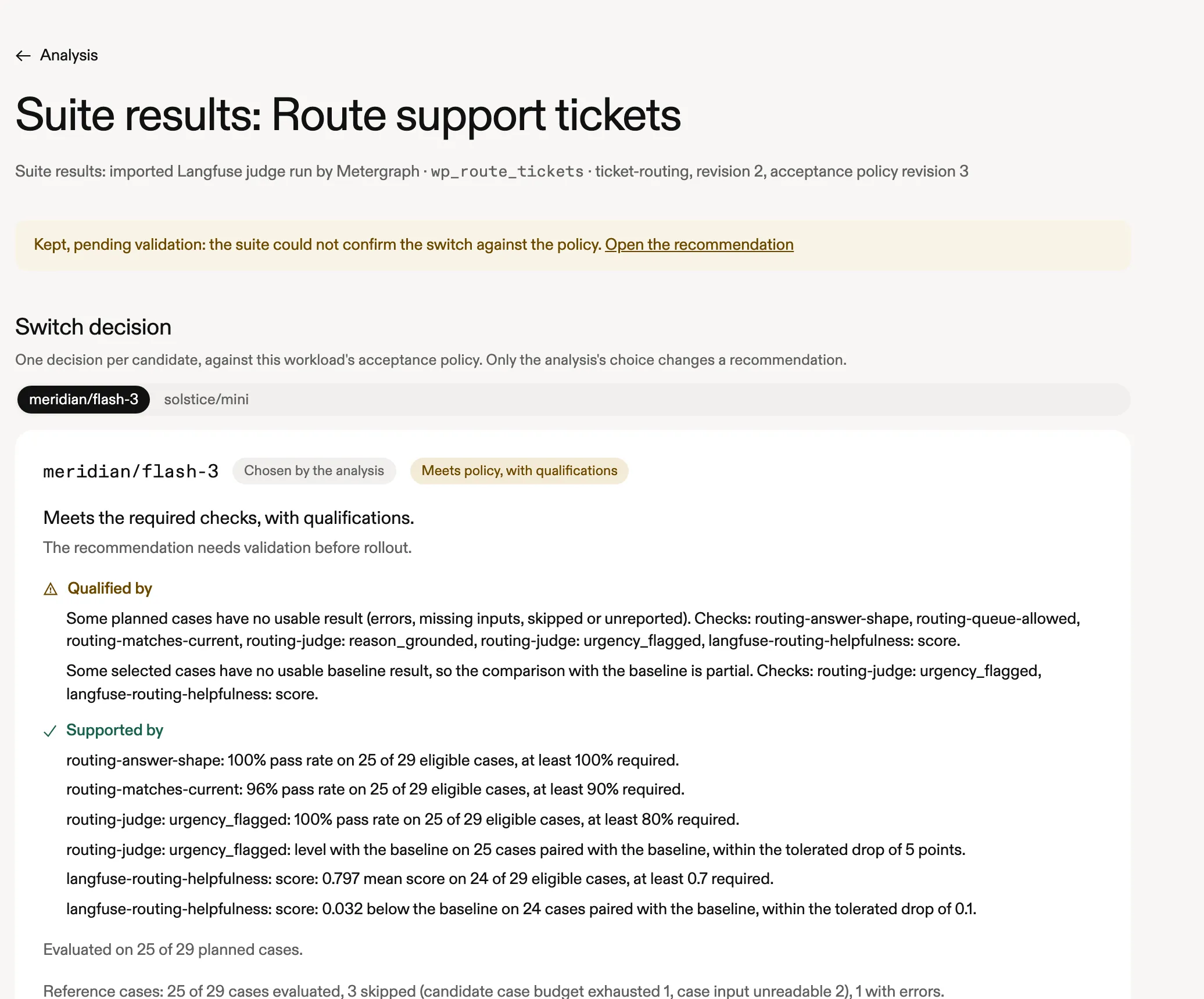
Section titled “Read the evidence”A workload whose suite decided the switch links View suite results from the recommendation’s Acceptance policy panel and from the workload page, and, when the switch was withheld, from the opportunities table. The page gives one decision per candidate, each check with its definition, how many cases it was measured on and why the rest are missing, and the cases behind it. The analysis’s own choice is the only candidate whose decision changes a recommendation.
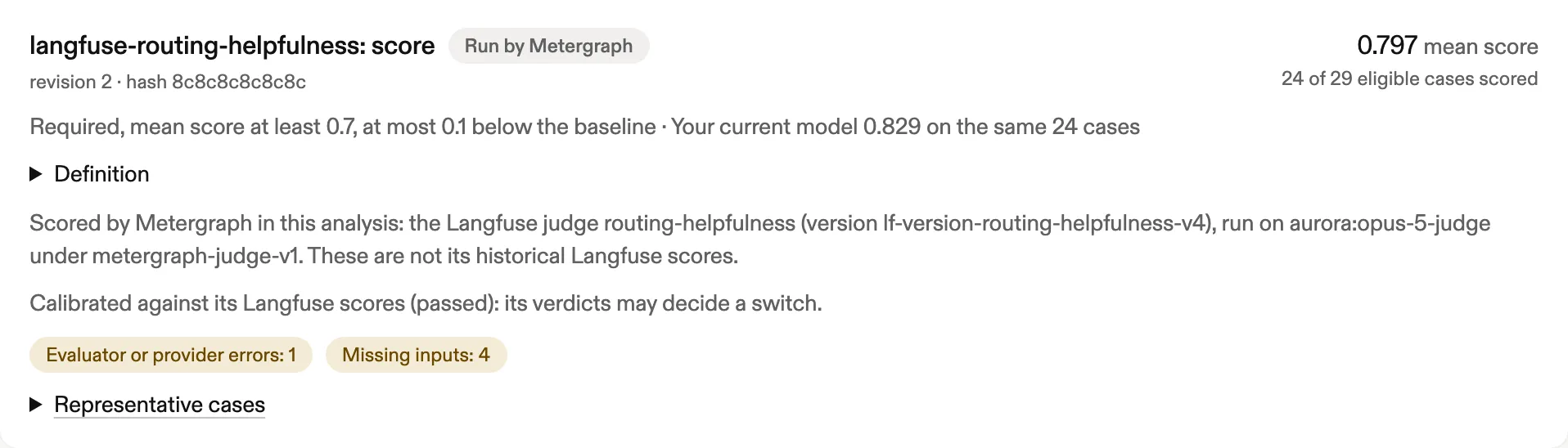
The imported judge’s check is marked Run by Metergraph: those are scores Metergraph produced in this analysis. The judge’s historical Langfuse scores stay in their own Historical scores section and never count.
Decision What happens to the recommendation Meets policy It stands Meets policy, with qualifications It needs validation before rollout. An advisory rule missed, or some cases have no usable result Inconclusive It needs validation before rollout. A required rule could not be measured, for example because the judge is not calibrated or too few cases have results Fails policy It is withheld and leaves the savings total. It cannot be delivered A rule an uncalibrated imported judge scores is shown with what it measured, for context, and never decides the switch.
What can be imported
Section titled “What can be imported”This is the complete list of what the evaluator preview and import report. The messages are the ones the API returns.
Supported
Section titled “Supported”A Langfuse evaluator is imported as a judge when every rule below holds for its latest version. The preview reports every rule that fails, not only the first.
- Its type is LLM-as-a-judge, with a prompt of
system,userorassistantmessages. The messages are copied in order. - Every prompt variable is mapped exactly once to
input,outputorexpected_output, with no JSONPath selector. The judge’s own variable mapping is used; when it has none, the evaluation rules’ mappings are used if they all agree and none is a legacy trace or dataset mapping. - Its score is numeric (with its bounds), boolean, or categorical with one category per result.
The judge runs at temperature 0 in Metergraph, because Langfuse exposes no generation settings for it.
Imported, with the model chosen in Metergraph
Section titled “Imported, with the model chosen in Metergraph”A judge whose only problem is its model is imported, with the problem recorded,
and does not run until you choose its model in step 4. The preview shows the
first message under judge_model. When the judge also fails another rule, it
is not imported and reasons shows the second message.
| Reason | Message when it is the only problem | Message when another rule also fails |
|---|---|---|
project_default_model |
This judge uses the Langfuse project’s default evaluation model, which the Langfuse API does not expose. Choose the model that runs it in MeterGraph. | This judge uses the Langfuse project’s default evaluation model, which the Langfuse API does not expose. Choose a dedicated model for the evaluator in Langfuse, then import it again. |
llm_connection_not_found |
The judge’s Langfuse LLM connection <connection> was not found, so its provider cannot be confirmed. Choose the model that runs it in MeterGraph. |
The judge’s Langfuse LLM connection was not found, so its model provider cannot be confirmed. |
unsupported_provider |
The judge runs on a <adapter> connection in Langfuse. MeterGraph takes only OpenAI and Anthropic judge models from Langfuse as they are, so choose a MeterGraph model or one of your custom endpoints. |
The judge runs on a provider MeterGraph cannot run judges on yet. OpenAI and Anthropic models are supported. |
custom_endpoint |
The judge’s Langfuse LLM connection <connection> uses a custom base URL, so the model behind <model> cannot be confirmed. Choose a MeterGraph model or one of your custom endpoints. |
The judge’s Langfuse LLM connection uses a custom base URL, so the model behind it cannot be confirmed. |
Two more apply when you choose the model, after import:
| Reason | Message |
|---|---|
model_not_callable |
MeterGraph cannot call <model>. Choose the model that runs this judge. |
channel_unavailable |
<model> is not reachable in this deployment: <detail> Choose another model, or ask your operator to configure that credential. |
Imported for reference only
Section titled “Imported for reference only”| Reason | Message |
|---|---|
code_evaluator |
Langfuse code evaluators run customer source code. MeterGraph does not run imported code, so rebuild this check as a MeterGraph evaluator. |
A Python or TypeScript code evaluator is copied as a read-only reference, with its source, and is never run or turned into a judge. A suite that contains one lists it as not evaluated. Rebuild the check as a Metergraph check to use it.
Not importable
Section titled “Not importable”| Reason | Message |
|---|---|
unknown_evaluator_type |
This Langfuse evaluator type is not part of the import contract. |
no_variable_mapping |
The judge has no variable mapping, so MeterGraph cannot tell which data fills its prompt. |
legacy_mapping |
The judge is mapped through a legacy trace or dataset evaluation rule, which Langfuse is retiring. Move it to an observation-level evaluator in Langfuse, then import it again. |
conflicting_rule_mappings |
The judge has no default mapping and its evaluation rules map its variables differently, so there is no single definition to import. |
prompt_variable_mismatch |
The judge’s prompt placeholders do not match the variables Langfuse reports. |
incomplete_variable_mapping |
At least one prompt variable is not mapped to exactly one data source. |
unsupported_variable_source |
A prompt variable reads from metadata, tool calls or experiment item metadata. Only input, output and expected output are supported. |
json_path_selector |
A prompt variable uses a JSONPath selector, which MeterGraph does not evaluate yet. |
unsupported_output_type |
The judge’s score type is not numeric, boolean or categorical. |
multiple_category_matches |
The judge can return more than one category per result, which MeterGraph cannot compare yet. |
variable_not_representable |
A prompt variable name cannot become a MeterGraph input slot without colliding with another variable. Rename the variables in Langfuse, then import again. |
definition_not_representable |
The definition cannot be stored as a MeterGraph evaluator: followed by the detail. |
code_language_unsupported |
The code evaluator is not written in Python or TypeScript. |
malformed_definition |
Langfuse returned a definition MeterGraph cannot read: followed by the detail. |
Dataset items that are skipped
Section titled “Dataset items that are skipped”| Reason | Message |
|---|---|
archived_item |
The dataset item is archived in Langfuse. |
media_references |
The dataset item references Langfuse media, which MeterGraph does not copy yet. |
missing_input |
The item has no input, so it cannot be a reference case. |
oversized_item |
The item is larger than a reference case can be (64 KiB of JSON, nesting depth 20). |
unsupported_shape |
The item has content a reference case cannot hold, for example numbers beyond 2^53 or more than 50 metadata keys. |
duplicate_item |
Langfuse listed this item id more than once; only the first copy is imported. |
malformed_item |
Langfuse returned an item without the documented shape. |
A whole dataset cannot be imported when it has more than 1,000 active items, when its importable cases add up to more than 8 MiB, when it has no active items, or when every item is skipped.
Re-importing
Section titled “Re-importing”Import again whenever the judge or the dataset changes in Langfuse.
- A judge whose Langfuse version and definition are unchanged creates nothing. A new Langfuse version that changes nothing Metergraph stores is recorded against the latest revision and creates nothing either.
- A changed judge gets a new revision. Its model has to be chosen again, and it needs its own calibration. Suites keep the revision they pinned until you move them.
- Only the latest revision is compared. A Langfuse judge changed back to what an earlier revision held gets a new revision rather than the old one.
- A changed dataset publishes its next version with the cases added, removed and changed. Bindings and analyses keep the version they pinned.
- A judge edited in Metergraph after import is your own from then on. A later import still lands on the same evaluator as a new revision.
Known limits
Section titled “Known limits”- Scoring candidates waits for a newer analysis pipeline. See the note at the top. Until then a suite with an imported judge cannot be assigned or run.
- Imported judges score reference cases only, never your sampled production traffic: the cases give your current model and every candidate the same input and expected output.
- The Analyze sheet cannot start a run that scores an imported judge. It does not send the judge budget. Use the API.
- Code evaluators are read-only. Metergraph does not run customer code.
- Judges on the Langfuse project default model are imported, but you choose the model that runs them, and their verdicts count only after a calibration passes on that model.
- A judge that reads an expected output cannot be calibrated, because the production calls it scored in Langfuse have no expected answer. Its verdicts are measured and shown but cannot decide a switch.
- A judge on a custom endpoint, a Fireworks model, or Amazon Bedrock in a deployment that requires application profiles cannot be calibrated or run by Metergraph’s own judge clients. Choose an Anthropic, OpenAI, Vercel AI Gateway or Bedrock model instead.
- Calibration trusts Langfuse’s score metadata. Langfuse does not sign it, and anyone holding the project’s secret key can write a score that looks like the evaluation worker’s. Metergraph attributes scores by that record only and never by name.
- Expected outputs are taken as written. A dataset item created from a trace can carry an expected output copied from that trace’s output, and the import cannot tell whether someone reviewed it. Check the dataset before you rely on it.
- Langfuse Cloud retires trace-level evaluators and the old dataset-runs
endpoint on 2026-11-16. A judge mapped through a legacy trace or dataset
rule is refused (
legacy_mapping); move it to an observation-level evaluator first. Metergraph never reads dataset runs. - Self-hosted Langfuse needs 4.23.0 or later for evaluator definitions, and 4.17.0 or later for scores calibration can attribute. The connection itself needs v4 or later. Evaluator and dataset imports have been verified against Langfuse Cloud only.
- Acceptance policies are API-only, one per assignment.
- Langfuse API reads are limited to six a minute per workspace for judge previews and imports, and separately six for dataset previews and imports.